I made a very basic video showing the new Director 12 and the publish to iOS process. I don’t include all the details about getting your Apple Developer stuff all set up or what should go in the info.plist, so don’t expect this to answer all those sorts of questions.
The iOS part begins around the 2:45 mark. Best if viewed in a larger window 🙂
Update: I forgot to mention one thing that is very important. In Xcode be sure you choose Xcode > Preferences > Downloads and make sure you install the Command Line Tools. If you don’t do this Director looks like it publishes, but you won’t see any output file.
Hi all. If you’ve noticed, I haven’t done many posts lately. There are a few reasons for this. The number one reason is that Director remains in a delicate place in the development world. A large number of people need multiple delivery platforms, particularly mobile apps, and Director can’t do that at this time (other than Mac/PC of course). I have barely played with mobile development but like the look of LiveCode/RunRev. It had a very old Director feel, but publishes to my iPhone (and many other platforms). Cool. I played with the trial version and remembered the early days of the “english language” programming (which I still do a bit of in Director from force of habit… go to the frame).
Another reason I’ve been a slacker on this site is that I’m now doing most of my work using the FlexBuilder Plug-in with Eclipse. I’m doing all my coding in Actionscript using an in-house framework. I just can’t quite get it. The unbelievably complexity of doing something like adding a push button crushes me. Multiple text files need to be edited and linked to one anther with long strings that barely mean anything to me. Hundreds of lines of code to make relatively simple things work. Packages. Importing math classes so you can multiply numbers. Class extensions. Endless subfolders along the lines of com.yada.deeper.something.why. The list of terms that I see every day is like a set of encyclopedias written in Klingon (yes, a sad geeky statement).
I’ve always been a very visual person. I can code, but I’m not a programmer. I loved Director because I could put things on the stage and then simply drag a behavior on to it. People use lots of terms for OOP, but I simply say “drag a behavior on to a sprite,” and that is all I ever needed to know with Director. Others could do vastly superior programming using really fancy OOP in Director, but that was not my real cup of tea. I was an experimental physicist in grad school, not a theorist. I needed to touch and see things.
Now, at the end of the day I never want to boot up my computer to play with Director (at night) since I’ve been crushed by the AS/Eclipse beast. Instead I play with photography on my iPhone, read news on my iPad, browse the web on my iPad, and often watch shows on my iPad. The day of work makes me not want to look at code.
I hope my tone doesn’t show that I have a problem with Director. I still love Director. When a prototype needs to get made I’ll always use Director. You can put things together in almost no time at all. In case you missed my tweet (I see my tweet connection on this site is broken…hmm), there was a story about how Director was used to prototype OSX: How Mac OS X Came To Be [Exclusive 10th Anniversary Story] http://bit.ly/hl0H7X. Love it.
Director can make a code-protected application with the push of a button that will run on modern computers. Yes, there are problems with Director if you are doing complex things that involve 3rd party Xtras, but I rarely had the need for those (which shows how simple my stuff was). At this point you always have to be aware of limitations on the Mac/PC as far as Xtras go.
If Director allowed me to create apps for my iOS device I would be back to using it on many spare evenings. But at this moment I’ve been having more fun with photography at night. I’ll still do posts when interesting things happen with Director, and even more if I start using it a lot, but other than that this blog will still stay relatively quiet. And on that note…
I’m starting up a new blog where I’ll just talk about photo apps for the iPhone and iPad. I have a feeling it will be far more active than this blog, since it is so much easier to do a blog that focuses on something I currently enjoy.
I actually forgot how much thought has to go in to a brand new blog! My biggest challenge was which URL to choose. I grabbed two and haven’t really decided yet. One is catchy, one is straight to the point. The two I went with are:
I keep flipping. Both domains currently work, but for the moment I’m using the more straightforward URL. Hmmm…
If you have an iPhone or an iPad and enjoy taking pictures, be sure to bookmark my new playground. Right now it looks a bit bland (other than my cool photos that make it on to the blog 🙂 That will slowly change over time, but I really do enjoy blogs where the theme is just in the “background” and the content is the important part. On the other hand, maybe I should use a lot of blink tags with big red text. So many decisions…
See you all on Direct-L. I’m still lurking, and even have something to say on rare occasions 🙂
A Director 11.5 patch was released yesterday and its available for all the Director 11.5 users through Auto Update. Following enhancements we have done as part of the new Director / Shockwave patch 11.5.8.612:
Flash 10 support
Flex Components Support
Cloth physics support
3D hardware anti‐aliasing support
Character controller support
Shockwave for Mac 64 bit
Far more information and discussion can be found in this Director Forum post.
We’ve waited awhile, but Shockwave was updated today. It now runs on OSX 10.6 (Snow Leopard) with the 64-bit version of Safari. It is version 11.5.8.612 and you can grab it from the Shockwave download page.
It seems to work nicely with Safari in either 64 or 32 bit mode, as well as Firefox 3.6+. On the Mac version of Firefox 4.0b3 it is still having many problems with the transparent region bug. Hopefully they fix this before 4.0 is released. This same bug keeps coming and going with various releases of Firefox.
So far the only thing I’ve seen is with the updateStage call. It doesn’t seem to be working when running in 64-bit mode, but it does in 32-bit.
My Mac is much happier now 🙂 and will survive without updateStage.
Update: There were many security fixes in this Shockwave update. More information is here.
An updated version of Shockwave was released earlier today, and for the first time since August 2008 I can once again use Firefox to view Shockwave content. I’m really glad to see this longstanding issue fixed. It definitely shows that more than just security updates are occurring on the development side of things. The next thing I can’t wait to see is Shockwave running in 64-bit on OSX 🙂
Here are the details from Allen at Adobe.
Modifications to Shockwave in update 11.5.7.609 are as listed below:
Product Area
Bug Description
Keyboard Events
Keyboard events are not getting registered properly on IE8 Vista and Win7 reported by various portals
Shockwave
During Shockwave installation on Windows 64 bit machines the IE security dialog appears for multiple times.
Cross domain
Crossdomain Policy changes to support media based crossdomain checks for Flash cast members.
Mac
Various redraw issues in Safari & Firefox while playing the Shockwave content.
Upgrade
Smooth Upgrade Process takes care of deleting the old Adobe/Macromedia Downloaded Xtras.
This release is considered a critical security update, as detailed on the linked security bulletin.
Details of the modified (additional) Cross Domain Policy changes follow;
Cross Domain Policy changes
Earlier to Director 11.5, there was no Cross-domain checking based on the policy file and thus when we play any shockwave content which was accessing data from a server outside the domain, it used to throw-up security dialogs. In Director 11.5, we introduced the cross-domain checking based on policy files, placed on the servers. This meant that even the URLs accessed by the SWFs were being checked by the Shockwave player against the policy file. But flash player as such does cross-domain checking through policy files or through other security mechanisms (security.allowDomain). The checks which were done through the latter mechanism inside Flash player are not supported in Shockwave and because of this, the content which were accessed by this mechanism failed inside Shockwave.
For example, we have a youTube video player asset, which is a SWF file and this can be used play different youtube videos by specifying the video ID. This has been implemented in Flash using the “security.allowDomain” mechanism for accessing the content from the YouTube server. This SWF can be hosted on any server (not only YouTube) and the videos can be streamed in.
This movie when embedded inside the Shockwave player fails since the player checks only the policy file on the YouTube server. And this policy File on YouTube server does not list any of domains.
In order to address this issue, we have introduced a flash cast member property cdpCheckMode which can be set to either #useMediaPolicy (to use the flash player’s cross domain checks) or #useSWPolicy (to use Shockwave’s cross domain checks).
When we set the property to #useSWPolicy and if the policy file doesn’t have the necessary entry then the content developer has two options.
1. If the movie property enableSecurityDialog is set to true then security dialogs will appear in the Shockwave movie while trying to access the content and the option of displaying the content is given to the end user.
2. On the other hand, if this flag is not set then the movie will fail silently.
_movie.enableSecurityDialog
Usage
— Lingo syntax
_movie.enableSecurityDialog
// JavaScript syntax
_movie.enableSecurityDialog;
Description
Movie property; default value is FALSE, If it is false then the movie will fail silently. If it is set to TRUE then security dialogs will appear in the Shockwave movie while trying to access the content and the option of displaying the content is given to the end user.
Example
This statement sets the enableSecurityDialog property to True which will show the dialogs.
— Lingo syntax
on prepareMovie
_movie.enableSecurityDialog = TRUE
end
// JavaScript syntax
function prepareMovie()
{
_movie.enableSecurityDialog = 1;
}
cdpCheckMode (Flash cast member property)
Usage
— Lingo syntax
member(whichFlashMember).cdpCheckMode
// JavaScript syntax
member(whichFlashMember).cdpCheckMode;
Description
Flash member property; default value is useSwPolicy. When we set the property to #useSWPolicy it will use Shockwave’s cross domain checks and if the policy file doesn’t have the necessary entry then the content developer has two options.
1. If the movie property enableSecurityDialog is set to true then security dialogs will appear in the Shockwave movie while trying to access the content and the option of displaying the content is given to the end user.
2. On the other hand, if this flag is not set then the movie will fail silently.
When it is set to #useMediaPolicy it will use the flash player’s cross domain checks.
Example
This statement sets the cdpCheckMode property to #useMediaPolicy which will follow the flash player’s cross domain checks.
— Lingo syntax
on beginSprite me
member(2).cdpCheckMode = #useMediaPolicy
end
// JavaScript syntax
function beginSprite(me)
{
member(2).cdpCheckMode = symbol(“useMediaPolicy”);
}
Yes, it has been awhile since I posted. Maybe that is because I haven’t been doing a lot with Director lately, or maybe I’m just sick of the web in general 🙂
Be sure to follow me on twitter just in case I get around to doing short/sweet posts. I noticed the other day I have lots of comments awaiting approval that my WordPress never bothered to let me know about. I’ll get to that this weekend.
There was a rumor on Direct-L that an announcement related to Director may happen in a few weeks, so if anything happens I’ll be sure to let you know. I just wish they would get a version of Shockwave for OSX 10.6. Such is life.
It was pointed out on Direct-L forums that another Director site has vanished from the web. The site titled Animation Math in Lingo by JM Harward now has an expired URL (http://www.jmckell.com/). Having sites go away is never good. You can still see an old version of the site on the Internet Archive.
In the meantime, I continue to hope that a version of Shockwave that runs on a Mac (without having to flip my bits) shows up one of these days. Please…pretty please.
There was an interesting post on FanBoy.com the other day asking if Flash was nearing the end of its life. It starts out mentioning how Director used to be king.
During the CD-ROM era of the 90s the only real game in town was Macromind Director. The program first started life out as an animation program bit with the boom in multimedia Director gained a programming language called Lingo and had a loyal following. Then the damn web came along and ruined it all: There was a web version of Director called Shockwave, but due to the overhead of bitmap graphics another program called Flash started to build rapid momentum. Macromedia would acquire Flash and rumor has it that Director is still around but the notion of getting a Lingo gig is history. And now that it’s the year 2010 I’m seeing the same thing slowly start to happen to Flash all over again.
I continue to wonder if Director is dead. The total lack of support for Shockwave on OSX 10.6 is really starting to feel like a nail in the coffin. Expecting casual computer users to flip the browser to run in 32-bit mode is something that just won’t happen. Since I’ve devoted the past fifteen years of my career to creating educational content for Shockwave I’m starting to feel I need to give it up and let the software gods pull my old Director 4 CD from my cold dead fingers.
In the education community, cross platform is more than a nice-to-have, it’s beyond important. If Shockwave isn’t available on the standard Mac setup it’s useless. If the Director IDE isn’t being actively developed for the current OS it’s not a dependable thing to predicate a development programme on.
We had this for a while with Rosetta / Firefox / OSX and after a fraught period of fighting with clients using Safari native for everything else and Firefox with Shockwave in Rosetta, everyone just gave up and we had to drop Mac support.
Director 11 / Shockwave on Macs was the only chance we have of staying with Director at all. To find that we are left high and dry with no solution again after six months of usable time in 10.5 is criminal on Adobe’s part.
The shockwave install on PCs is bad enough … it’s only saved because of the MSI version.
When OS X first came out, Safari was the problem browser, at least Firefox / Rosetta / Shockwave was 90% dependable. Now Firefox / Shockwave is 100% undependable and all we have is Safari / Shockwave which is at best 90% dependable. To find that Adobe have taken that away is unbelievable.
Get your act together guys. Adobe appear to be killing Director as a product without admitting to it.
You can kill it by saying you are killing it, or you can kill it by starvation. At least owning up and saying you are stopping development would give us a clear path, we could cut our losses and make a decision on what to do next.
Giving a little bit of encouragement and then taking away all hope repeatedly is a very immoral thing to do.
*Furious*
Education Software Developer
UK
That sums it up. Every day I wonder if the End-Of-Life statement for Director will be released. I’ve been spending a lot of time learning ActionScript. I just haven’t been able to become a fan. I think Lingo ruined me. I didn’t have to worry about case. If I missed a little bracket I wouldn’t be presented with bizarre error statements. I could say ‘i = 1’ just by typing that. In AS3 it requires about fifty lines (maybe that is a minor exaggeration).
The reason Flash has become such a hot topic in the past week was the introduction of the iPad (please…no jokes about the name). The iPad does not support Flash. This has the web community rather split. Some say who cares, others think Flash is the only thing worth seeing on the web.
I’m somewhat neutral on the topic. I use FlashBlock on Firefox to avoid most everything, but there are some specific things I want to see (such as what I create). But on the iPad, I have an opinion. I want one. I plan to order one as soon as I can. It will be able to do all the typical things I do in the evening. Browsing, reading, catching up on email, an occasional game, etc.
I also played with GameSalad the other day. It took me about 25 minutes to make a small educational app for my iPhone (or iTouch or iPad). I found the interface simple and straightforward. I felt comfortable with the program. When I first started playing with Director back in 1994 I found that easy to use. It became my favorite toy, and then my career.
Will GameSalad become my next toy? Will my career turn towards the iPhone/Touch/Pad? I don’t know, but I can’t wait to get that iPad in my hands and see what I can do with it.
Or maybe Director will rise from the dead. What are the odds? What is Adobe thinking?
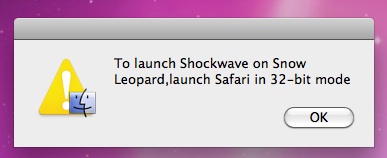
An updated version of Shockwave was released today. When installing on Snow Leopard (OSX 10.6) it now gives you a message to run Safari in 32-bit mode.
This is definitely friendlier than the prior message.